Water Quality Simulation Specification
1. Overview
| WQ Simulation Specification | |
|---|---|
| Conditions | if the Include Advection Dispersion (AD) Water Quality option selected in the Simulation Specification dialogue |
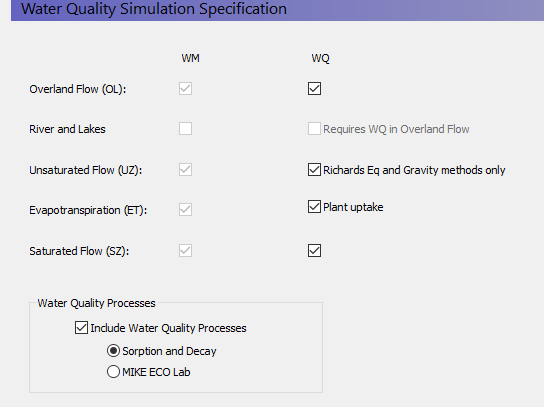
In the WQ Simulation Specification dialogue, you can select which components of the hydrologic cycle will be included in the water quality simulation. The advection dispersion method calculates solute movements based on the intercell flows calculated in a water movement simulation. Therefore, only those components that are included in the water movement solution can be selected.
Solute transport in surface water bodies is calculated by MIKE 1D. If solute exchange to the river is to be simulated, then the water quality must also be simulated in overland flow.
In the unsaturated zone, water quality cannot be calculated in the 2-layer water balance method.
If selected, plant uptake by roots is treated as a solute sink in the unsaturated zone.
Include Water Quality Processes - Sorption and first-order decay of solutes can be calculated by the water quality module. Turning on this option will allow you to specify decay in overland flow, and both sorption and decay in the UZ (Gravity and Richards methods) and SZ (Finite Difference method) modules.
Sorption and Decay -
MIKE ECO Lab - MIKE ECO Lab options (see Working with MIKE ECO Lab in MIKE SHE - User Guide)
Related Items:
- Working with Solute Transport - User Guide
- Advection Dispersion - Reference
- Reactive Transport - Reference
2. WQ Simulation Title
| WQ Simulation Title | |
|---|---|
| Conditions | if the Include Advection Dispersion (AD) Water Quality option selected in the Simulation Specification dialogue |
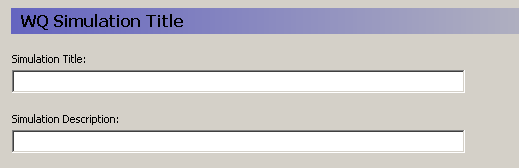
Title and Description - The Title and Description will be written to output files and appear on plots of the simulation results.
Related Items:
3. WQ Simulation Period
| WQ Simulation Period | |
|---|---|
| Conditions | if the Include Advection Dispersion (AD) Water Quality option selected in the Simulation Specification dialogue |
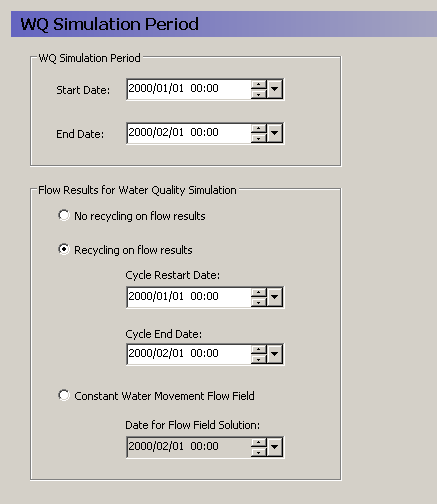
WQ Simulation Period
The water quality simulation does not have to be the same length as the water movement simulation. The only restriction is that the start date for the water quality simulation must be within the water movement simulation.
Flow Results for Water Quality Simulation
A water quality simulation requires the cell-by-cell water fluxes calculated by the water movement simulation. However, the water quality simulation does not have to be the same period as the water movement simulation. Therefore, the user interface is flexible in how it will use water movement cell-by- cell flow data.
No recycling on results - In this case, the water quality simulation end date must also be within the water movement simulation period, which means that the water quality simulation cannot extend beyond the water movement simulation.
Recycling on flow results - In this case, the water quality simulation can be much longer than the water movement simulation, based on a repeated set of water movement results. The water quality simulation starts on the Start Date with the flow results from the Cycle Restart Date. When the water quality simulation period reaches the Cycle End Date, the WQ simulation will continue but the flow results will be restarted at the Cycle Restart Date.
If the recycle dates do not match one of the saved time steps, then the nearest saved time step is used.
For example, you may have a two-year water movement simulation, but you may want to simulate water quality for 10 years. To do this, you would specify the start and stop dates of the part of the water movement simulation that you want repeated. If you want to repeat the whole water movement simulation, then you would specify the beginning and end of the water movement simulation.
Constant water movement flow field - In this case, the nearest saved time step to this date will be used as a steady-state flow field for the transient water quality simulation.
Related Items:
4. Water Quality Time Step Control
| WQ Simulation Period | |
|---|---|
| Conditions | if the Include Advection Dispersion (AD) Water Quality option selected in the Simulation Specification dialogue |
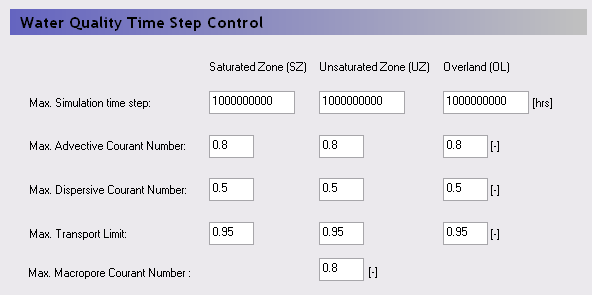
The water quality simulation is completely decoupled from the water movement simulation and like the water movement itself, the water quality time steps can be different in each of the overland flow, unsaturated flow and saturated flow.
Maximum Simulation Time Step - This is the maximum user-specified time step allowed. The default value is very high so that the simulation runs by default with the highest possible time step. You might want to set this value to a short time interval, if you want the WQ time step to be uniform during the WQ simulation.
Stability Criteria
The courant number is a measure of the ratio of flow rate to grid size. For numerical stability, it is important that a dissolved solute does not travel too far in one time step. A courant number greater than 1.0 implies that a particle (solute) would move completely across or through a cell in a time step. The time step is reduced until all the time step criteria below are met.
Max. Advective Courant Number - The advective courant number represents the ratio of cell size to the time it would take a particle to move across a cell. This criterion is likely to be controlling if your flow velocities are high, or your dispersivity values are very low or zero. The default value is 0.8. If your actual time step is being controlled by this criterion, then you could increase it to make the simulation run faster. However, you will need to check to make sure the simulation has converged properly and that the mass balance is reasonable.
Max. Dispersive Courant Number - The dispersive courant number represents the ratio of the cell size to time it would take a particle to move across a cell due to dispersion. This criterion is likely to be controlling when the velocities are very slow and the dispersivity is non-zero. The default value is 0.5. If your actual time step is being controlled by this criterion, then you could increase it to make the simulation run faster. However, you will need to check to make sure the simulation has converged properly and that the mass balance is reasonable.
Max. Transport Limit - The transport limit restricts the fraction of the total amount of mass that can leave the cell in one time step. The default value 0.95, which usually does not limit the time step.
Max. Macropore Courant Number - The macropore courant number represents the ratio of UZ cell thickness to the time it would take a particle to travel vertically across a UZ cell due to macropore flow. This criterion is likely to be controlling if your macropore velocities are high. The default value is 0.8. If your actual time step is being controlled by this criterion, then you could increase it to make the simulation run faster. However, you will need to check to make sure the simulation has converged properly and that the mass balance is reasonable.